BUILT AROUND REAL BUSINESS
RESTAURANT POSPILOT TESTING

Every order.
Every handoff.
One workspace.

Triple B Business Solutions builds practical software around everyday business work. For restaurants, that means connecting orders, kitchen handoffs, billing and stock in one clear workspace.

Made for the everyday pace of restaurants and cafés.

✓
Order → kitchen handoffIllustrative flow · Table 04
●   TBS / Restaurant workspaceProduct preview
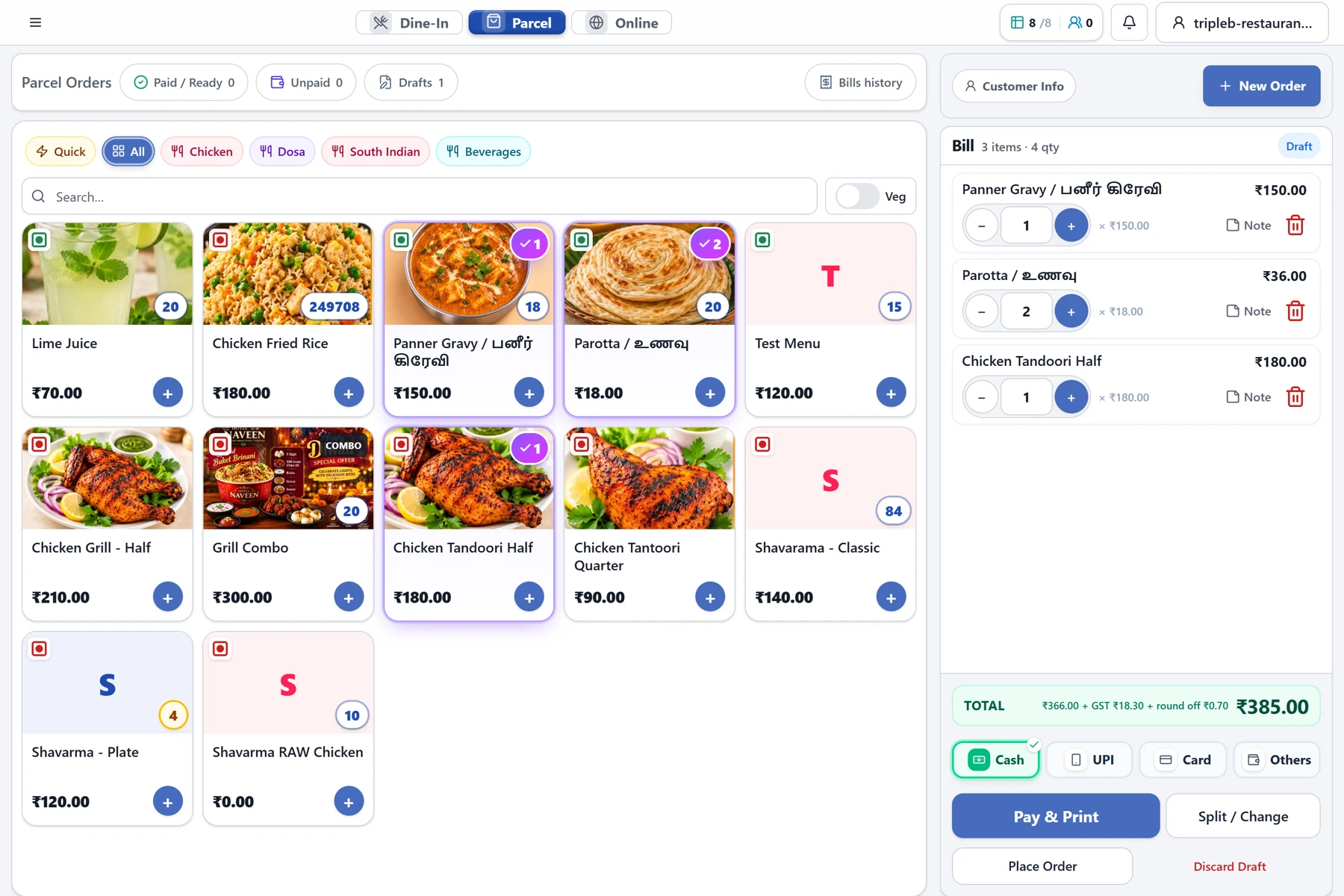
Restaurant POS showing menu items, order cart and split payment options
→
Orders · stock · billingOne practical workspace

Actual product screen · Pilot environment

Tablet, phone & PCEnglish + Tamil item namesUPI & GST workflowsSingle & multiple outlets
A simple place to begin

Not sure where to start?
Follow these 3 steps.

See what the POS helps solve, follow one order through service, then decide if it fits your outlet.

  1. 01FIRST · EXPLORE

    See the POS features

    Explore billing, kitchen, stock and owner tools for the day-to-day work of a restaurant.

    Explore restaurant POS
  2. 02NEXT · FOLLOW

    Follow one order

    See a table order move from the first tap through the kitchen and on to the bill.

    Watch the order flow
  3. 03THEN · TALK

    Request a product demo

    Share a little about your outlet and open the demo request form.

    Go to the demo form
One order. Everyone connected.

See a smoother service
take shape.

Follow one order in the TBS app—from order entry and stock updates to kitchen preparation, server handover and the final payment receipt.

01 / Order taking

Capture the order.
Keep each detail.

Choose a table, add items and note special requests so the order is ready for the next step.

Order captured · Table 04
Table 04Order #T04
Veg biryaniLess spicy
1
Lime juiceNo added sugar
1
Send to kitchen

Illustrative items · Demo order

ILLUSTRATIVE WORKFLOW · NOT A LIVE ORDER

Why TBS starts with restaurants

When the work is scattered,
service gets harder.

Triple B Business Solutions builds practical software around everyday business work. We start with restaurants because one busy service connects orders, kitchen handoffs, billing, stock and customer updates—all at once.

The Restaurant & Café POS brings those repeat tasks into one workspace. It is in pilot testing now.

See one order move through service
THE EVERYDAY PROBLEMWHAT THE POS DOESHOW IT CAN HELP
01
ORDERS

“Did that order reach the kitchen?”

When orders travel by memory or get entered twice, details can go missing.

CONNECTED ORDER FLOW

Bring table, takeaway and online orders into the restaurant workspace, with notes that follow each order.

THE BENEFIT

Clearer handoffs from the counter to the kitchen.

02
BILLING

Long queues and repeated calculations.

Manual totals, split bills and payment checks can slow down checkout.

BILLING & PAYMENTS

Use item-based billing, split payments, UPI, card, cash and GST workflows.

THE BENEFIT

A more consistent checkout with less rework.

03
STOCK

Popular dishes run out as service gets busy.

Stock changes and sold-out items are easy to miss across shifts.

MENU & STOCK CONTROLS

Update item availability, track stock movements, wastage and transfers.

THE BENEFIT

See what is available and help reduce avoidable wastage.

04
CUSTOMERS

Guests need an easier way to order again.

Phone-only ordering can leave customers unsure what is available or ready.

ONLINE & FOLLOW-UP

Offer a direct ordering website, pickup and delivery rules, order tracking and WhatsApp updates.

THE BENEFIT

A clearer path to order—and a reason to return.

05
OWNER VIEW

Daily performance is hard to piece together.

Sales, outlet activity and reports may be spread across different records.

DASHBOARD & REPORTS

Review sales, GST reports and outlet status from the owner overview.

THE BENEFIT

Clearer information for everyday decisions.

OUR CURRENT FOCUS

Restaurant & Café POS · Pilot testing

Hospital Management · In developmentRetail & Supermarket · Planned
Meet your restaurant's new workspace

From a busy counter
to a clearer business picture.

Let's walk you through it
01 / At the counter

A smooth finish
to every order.

Keep dine-in, takeaway and online billing in one place, with flexible ways to pay.

  • Cash, UPI, card & split payments
  • Discounts, refunds & reprints
  • GST invoices & bill history
Customer online ordering

A clearer way for guests to order.

Give customers a direct path from menu to checkout, while online orders stay connected to your restaurant team.

  • Guests browse dishes and current prices
  • Pickup and delivery follow your outlet rules
  • Order progress stays clear on their phone
Explore all product screens
01 / BROWSE

A menu guests can explore.

Customers see your dishes, prices and pickup or delivery options in one place.

CUSTOMER VIEW PRODUCT SCREEN
One workspace, grouped around your day

Tools for the jobs
you do every day.

Start with the tasks that keep service moving. Each part connects to a practical outcome for your team.

01TAKE & SETTLE ORDERS

Orders & billing

Handle dine-in, takeaway and online orders. Take cash, UPI, card or split payments, with GST bills and bill history.

Helps: keep each order and payment together from first tap to final bill.
02COORDINATE SERVICE

Kitchen operations

See new, preparing and ready orders. Kitchen notes and partial-ready updates stay with the order.

Helps: make it clearer what the kitchen is working on and what is ready.
03REACH & UPDATE GUESTS

Online ordering & follow-up

Give guests your restaurant ordering website, set pickup and delivery rules, share order progress and send WhatsApp updates or offers.

Helps: make direct ordering easier and keep customers informed. Plan and message charges apply.
See the customer journey
04MANAGE THE OUTLET

Stock & team

Set menu availability, track stock, wastage and transfers, and keep attendance and wage records.

Helps: know what is available and keep routine outlet records in one place.
05SEE THE BUSINESS

Owner insights

Check daily sales, GST reports and outlet status. Multi-outlet owners can see their enabled locations together.

Helps: make day-to-day choices with clearer information.
How these tools can support sales

More ways to order.
More reasons to return.

Together, these tools make it easier for guests to order directly, notice offers and return—while helping your team keep service moving.

01 / DIRECT

Make ordering easy

Your own online menu gives guests a direct path to pickup or delivery.

02 / VISIBLE

Stay in touch

Offers and order updates can keep customers informed between visits.

03 / READY

Keep popular items moving

Order and stock visibility can help teams stay on top of availability during service.

Feature availability depends on plan and outlet configuration. Hardware and payment setup are confirmed during onboarding.
A practical start

Let's make it work
for your business.

Start with the workflows you need. Add more as your team gets comfortable.

01

See it in action

Walk through your daily operations in a product demo.

02

Make it yours

Set up your menu, tables, outlets and the modules you need.

03

Bring your team

Configure staff roles and introduce the workflows.

04

Start, then grow

Begin with one outlet and build on your experience.

Built with everyday operations in mind

Software for the
work behind the counter.

Triple B Business Solutions builds practical software around everyday business work. We start with restaurants, where orders, kitchen handoffs, stock and customer needs meet during every service.

The Restaurant & Café POS is in pilot testing. We use operator feedback to refine the workflows while the product is being tested.

Explore a demo for your business
EARLY PILOT · TESTING IN PROGRESS

Learning where
the work happens.

Restaurant operations · Madurai, Tamil Nadu

Counter workflowsStaff experienceProduct feedback
Why we're building TBS

We believe independent businesses deserve software shaped around the real work of running an outlet. TBS brings orders, teams, stock and customer updates into a clearer daily flow—and a straightforward walkthrough helps owners see how the tools fit their restaurant.

A few things you might ask

Simple questions.
Clear answers.

Have a different question? We can walk through it in your demo.

Will it work on my tablet or computer?

The platform is a browser-based web app / PWA for phones, tablets and PCs. We confirm your device and printer setup during onboarding; there is no native Android or iOS app.

Can I use it for more than one outlet?

Yes. One owner can manage multiple outlets, each with its own menu, prices, staff and enabled modules. Access depends on your selected plan.

Does it work without the internet?

Core operations require an internet connection. Cached menu access and saved drafts help with brief connection interruptions; this is not fully offline billing.

Can customers order without installing an app?

Yes. Online ordering and table QR ordering work in a browser. Guests can browse and place orders from their phone.

Are Tamil menus supported?

Items can have English and Tamil names. The staff application interface is in English.

What does it cost?

Plans and feature packages are being finalized for launch. A demo will help identify the right setup; messaging, payment and hardware costs are discussed separately where applicable.

Your next chapter starts with a conversation

Tell us about
your business.

Restaurant, café or a growing chain?
Let's explore what a connected workspace could look like for you.

Contact details will be added before launch.
This is a website design sample.

Preview only: this form does not send or save your details. Live enquiry delivery and a privacy notice will be connected before launch.

Our productsBook a demo
The TBS product familyTalk to us

Actual product screen from a pilot environment. Displayed figures are not business performance claims.